Noise Buds VS303 TWS Earbuds with 13mm Driver, 24Hrs Playtime launched: Check Specs & Pricing
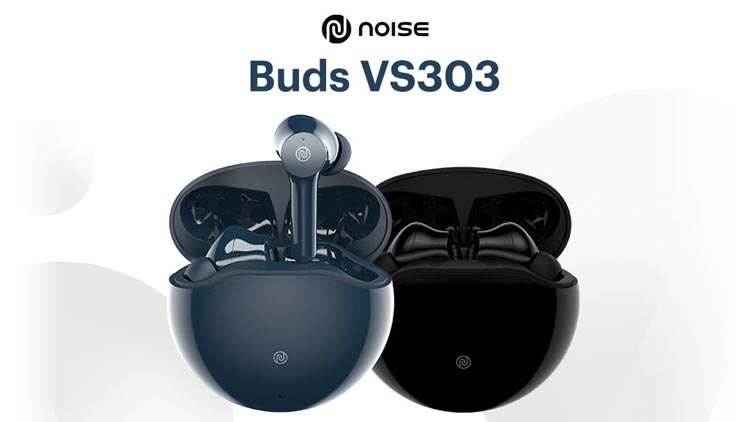
Noise Brand launched its new Truly wireless earbuds in the Indian market which is Noise Buds VS303.
Noise Buds VS303 comes with a 13mm dynamic driver which gives you a loud and clear sound experience.
As the company states that Noise Buds VS303 offers you up to 24 hours of total playback time including charging case battery but on a single charge it gives you 6 hours of playback time without charging case.
It supports USB Type-C for charging and also comes with fast charging feature. It takes around 1.5 hours to fully charge the earbuds completely. So on a single charge, you can enjoy an entire day of music, calls, and more with these earbuds.
Noise Buds VS303 comes with Hyper Sync technology that helps to make an instant connection with all your previously paired devices and it has Bluetooth v5.0 for connectivity.
Noise Buds VS303 comes with a full-touch controls feature that means you can manage audio with just a touch so you don’t have to reach out for your phone all the time. You can adjust the volume level with just a tap.
As far as the design is concerned, the Noise Buds VS303 comes with an Ergonomic design because of this, if you put these earbuds in your ears, then you will feel very comfortable and you can put in them for a long time without any problem.
Noise Buds VS103 Truly Wireless Earbuds Launched: Check Specifications, pricing
Noise Buds VS303 supports Voice assistants like Google Assistant and Apple Siri. With the help of a voice assistant, you can control your device with just a command.
You do not get to see any Noise cancellation feature in this Noise Buds VS303. It comes with a single microphone in each earbud. Noise Buds VS303 comes in two different color options, Jet Black and Space Blue.
Table of Contents
Noise Buds VS303
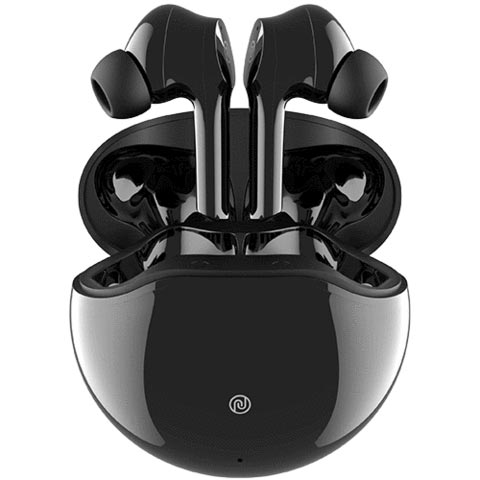
Noise Buds VS303 full Specifications
| Brand | Noise |
| Product Name | Noise Buds VS303 |
| Headphone Type | True Wireless |
| Headphone Design | Earbud |
| Touch Controls | Yes |
| Mic | Yes |
| Noise Cancellation | No |
| Connectivity | Bluetooth v5.0 |
| Wireless Range | 10 meter |
| Deep Bass | No |
| Water-Resistant | No |
| Device Supports | Android, iOS, Laptop |
| Driver Type | Dynamic |
| Driver Unite | 13mm |
| Codec | AAC, SBC |
| Battery Capacity | – |
| Charging Type and Time | Type-C Port, up to 24hrs total playback time |
| Fast Charging | Yes, Takes about 1.5 hours for the full charge |
| Color Options | Jet Black, Space Blue |
| Item Weight | Earbuds: 4.3g Charging Case: 34.2g |
| Warranty | 1 Year |
Availability and Pricing
The Noise Buds VS303 is available to buy on Amazon. As far as price is concerned, the price for the Noise Buds VS303 is Rs.1,799.
Touch Controls function for Noise Buds VS303
- Touch and hold the left earbud for 2 seconds to go back to the previous track.
- Touch and hold the right earbud for 2 seconds to go to the next track.
Oppo Enco Buds TWS Earbuds with up to 24Hrs of battery launched in India
FAQs
Are the earbuds compatible with iPhones?
Yes, Noise Buds VS303 earbuds are compatible with iPhones.
How do I check the Buds VS303 battery level?
You can check the battery level of the Buds VS303 earbuds on your smartphone. Go to the notification bar and look at the Bluetooth icon. The battery level is mentioned under it. You can also check the battery status of the charging case on the case. A blinking red LED indicates charging while a red LED indicates fully charged.
Do they support Bluetooth 4.2?
Noise Buds VS303 earbuds are best suited with Bluetooth v5.0. However, they also support smartphones with Bluetooth v4.2 as well.
Can Noise Buds VS303 be connected to a laptop/computer?
Yes, they can be connected to the laptop/computer.
Do Noise Buds VS303 have noise cancellation mode?
No, Noise Buds VS303 does not feature noise cancellation mode.
Can I charge Buds VS303 with my PC/laptop?
Yes, you can charge the earbuds with your PC/laptop.
How to reset Buds VS303?
Before resetting, ensure that the earbuds and the case are charged fully. On your paired devices, remove/delete Noise Buds VS303 from the list of paired devices in the Bluetooth menu. Take out the earbuds from the charging case. Touch and hold the earbuds for 5 seconds to turn them off. The LEDs will blink indicating that they have been reset. Now place both earbuds inside the charging case and close the lid. Repeat the pairing process.
You May Also Like